

Professional services firms often lose clients because a follow-up slipped, a handoff got messy, or the one person who held the relationship left and took all the context with them. A CRM for professional services is meant to stop that, but a lot of them are really built for high-volume sales teams chasing new logos, not for firms where the same clients come back year after year and the relationship is the actual product.
This guide is for anyone running client relationships at a professional services firm, from consultancies and agencies to accounting, advisory, and investment teams. You'll find a quick comparison table, a short list of things to check before you commit to any CRM, then a breakdown of each tool with its features and pricing.
1. Rings AI
Rings AI is a CRM for businesses that win through long-term relationships, like venture capital, investment banking, private equity, and professional services firms. In these businesses, the same contacts come back deal after deal, so a contact's history matters more than which stage a deal sits in. Rings is built around people and the full context attached to them, instead of a sales pipeline that empties out every time a deal closes. That makes it a strong fit for relationship-led teams and a poor fit for fast-moving sales teams judged on deal volume.
Key features
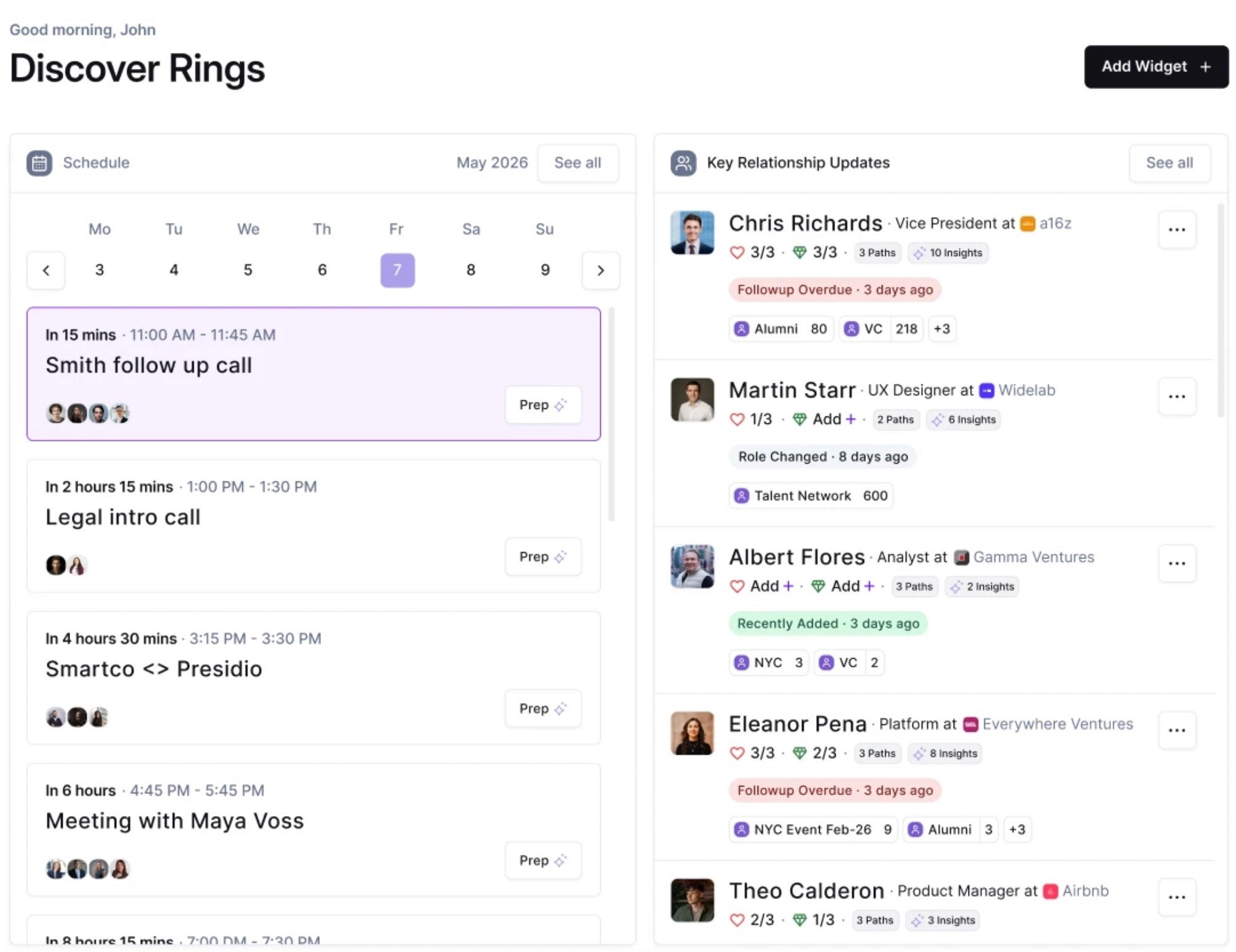
Rings builds your relationship graph automatically by capturing historical and current email and meeting activity, then scoring each relationship, so the network forms without manual contact entry.
Pathpower® maps how your team connects to a target across the wider market, folding in investors, board members, and advisors rather than only the company's direct employees.
A built-in database of more than 150 million global records overlays your own relationship data with contact records and round-by-round funding history, reducing the external lookups a deal team would otherwise run.
The Complete AI feature generates meeting prep dossiers, relationship summaries, and process briefs using your team's activity, market data, and the web together.
People-first processes let you track pipelines, fundraising, events, introductions, and projects inside Rings, replacing the side spreadsheets these workflows usually live in.
A Chrome extension works inside Gmail, LinkedIn, and across the web, and the iOS app carries the same functionality as the web app for relationship work on the move.
A data team handles migration from other CRMs and transfers firm-specific process histories during onboarding.
Pricing
Rings AI does not publish pricing publicly, so you get a custom quote based on your firm's size and needs. To get numbers, book a demo with the Rings AI team, who will scope pricing during onboarding.
2. Copper
Copper is a CRM built to live inside Google Workspace, aimed at relationship-focused service businesses like agencies, consultancies, and financial services firms. It fits small teams that run their day out of Gmail and want their CRM to update itself as they email, rather than asking them to log everything by hand.

Its strongest trait is how tightly it sits on top of Gmail, Calendar, and Drive, so contact and deal records build up from normal inbox work. The flip side is that the product is shaped around Google Workspace, so teams on Microsoft 365 get much less out of it.
Key features
Copper works directly inside Gmail and Google Calendar, so you can add leads, log conversations, find files, and manage tasks without leaving your inbox. It also syncs Google Contacts and Drive automatically.
Visual drag-and-drop sales pipelines let you move deals between stages, sort by value, and see win probability, with flags that surface opportunities that are slipping.
You can turn a closed deal into a project inside Copper, which keeps the handoff from sales to delivery in one tool instead of a separate document or app.
Task and workflow automation logs calls, meetings, and activities for you, and triggers follow-up emails or reminders when a deal changes stage (workflow automation on the Professional plan and above).
Reporting covers revenue projections, customer trends, and team activity, with fully custom reports available on the Business plan.
Rekindle emails and email series re-engage contacts you haven’t spoken to in a while, sending follow-ups automatically (email series on the Business plan).
A Chrome extension and LinkedIn integration let you research and add contacts from any website, and the mobile app lets you log calls and SMS so records stay current on the road.
Pricing
Copper is priced per seat per month and billed either monthly or annually, with annual billing running cheaper. There is a 14-day free trial with instant activation and no credit card required, but no permanent free tier. Higher tiers raise the contact limit and add automation, bulk email, reporting, and email series. Some support features, such as personal onboarding and premium support, also carry seat minimums.
Basic ($23 per seat/month annually, $29 monthly): Covers a 2,500 contact limit, pipelines, task automation, project management, and contact enrichment.
Professional ($59 per seat/month annually, $69 monthly): Adds a 15,000 contact limit, workflow automation, bulk email, reporting, and integrations.
Business ($99 per seat/month annually, $134 monthly): Adds unlimited contacts, email series, custom reports, multi-currency, and premium support.
3. Pipedrive
Pipedrive is a sales pipeline CRM known for being quick to set up and easy to run, which is why smaller professional services firms like consultancies and M&A advisors use it to push deals through clear stages. It suits teams that want pipeline visibility and automation without a long implementation or a dedicated admin.
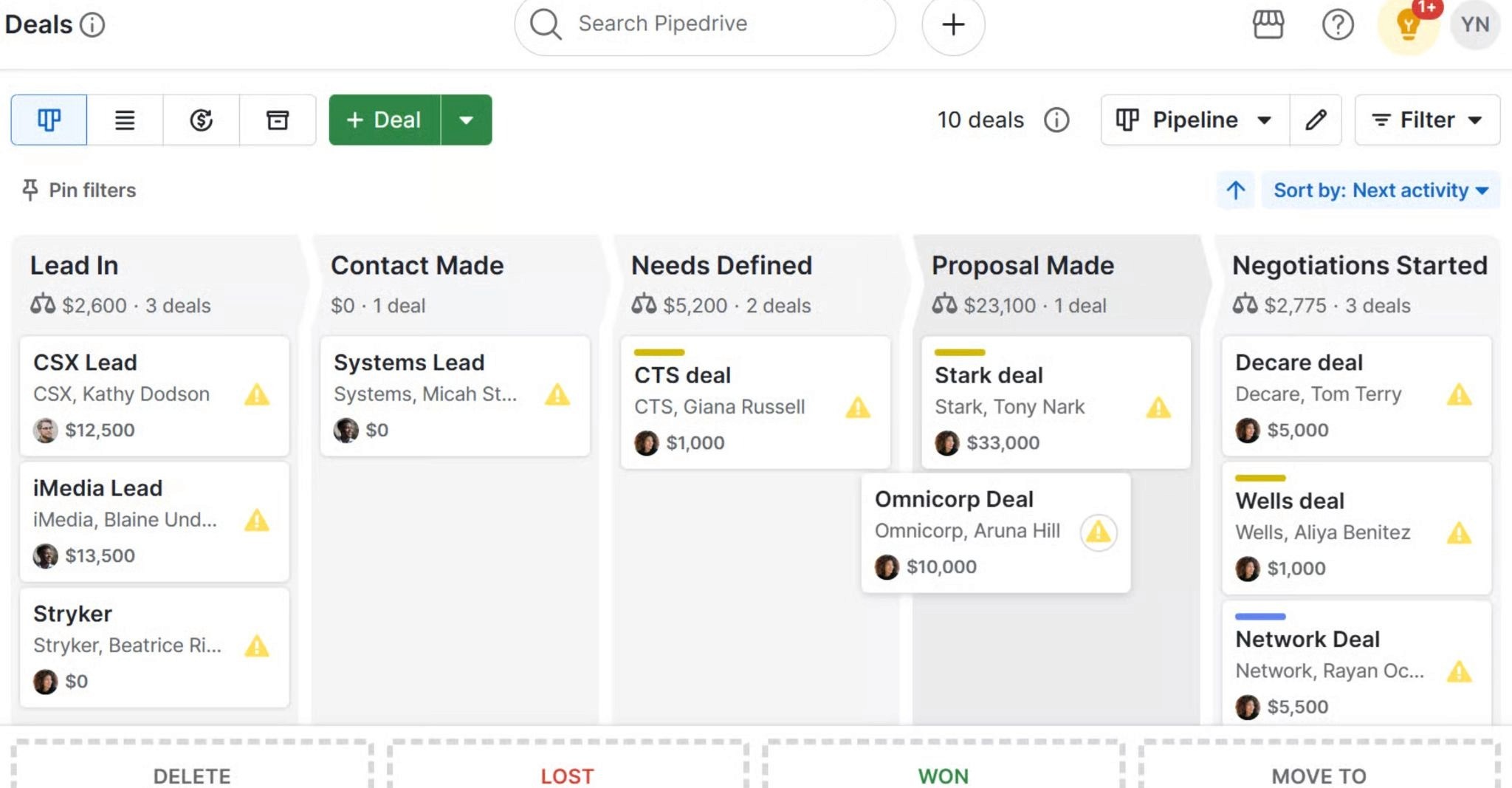
Its main strength is the visual drag-and-drop pipeline paired with rules-based automation that almost anyone on the team can configure. The trade-off is that the product is built around the sales pipeline, so service delivery and project work depend on a paid Projects add-on rather than shipping in the core CRM.
Key features
A visual pipeline brings leads, deals, contacts, and calendar events into one workspace, where you drag deals between stages and spot overdue follow-ups in a real-time feed.
Workflow automation triggers actions from set conditions, such as sending follow-up emails or assigning a lead to the right rep by location, industry, or deal size (advanced automations and nurturing sequences on the Growth plan and above).
Full email sync with open and click tracking lets you send bulk emails and run sequenced follow-ups directly from the CRM (Growth plan and above).
You can send and track quotes, proposals, and contracts inside Pipedrive with built-in e-signatures, keeping deal paperwork in one place (Premium plan and above).
Reporting and analytics give real-time pipeline insights, with AI report creation from text prompts, as well as custom reports and fields for teams (custom reporting on the Premium plan).
LeadBooster captures inbound and outbound leads and routes them to reps automatically (Premium plan, or as a separate add-on on lower plans).
A Projects add-on handles service delivery and onboarding after a deal closes, and the marketplace connects with more than 500 apps including Zapier, Zoom, and PandaDoc.
Pricing
Pipedrive is priced per seat per month and billed either monthly or annually, with annual billing cheaper. There is a 14-day free trial with no credit card required and no permanent free tier. Several capabilities sit behind paid add-ons billed separately from the seat price:
Lite ($14 per seat/month): Covers lead, calendar, and pipeline management, AI report creation, a real-time sales feed, and 500+ integrations.
Growth ($24 per seat/month): Adds full email sync with tracking, bulk email, automations and nurturing sequences, subscription and forecast reports, and a meeting scheduler.
Premium ($49 per seat/month): Adds lead generation and routing, custom scoring and company data enrichment, AI multi-email tools, contracts and e-signatures, and enhanced customization for teams and reports.
Ultimate ($69 per seat/month): Adds fortified account security rules, phone and email data enrichment, a sandbox testing account, extended phone support, and partnership discounts.
4. Zoho CRM
Zoho CRM is a broad, heavily customizable CRM that scales from solo users up to large teams, and it tends to appeal to professional services firms that want a lot of control without a high price. It fits firms that are comfortable shaping the tool to their own processes, since much of its value comes from configuration rather than working out of the box.
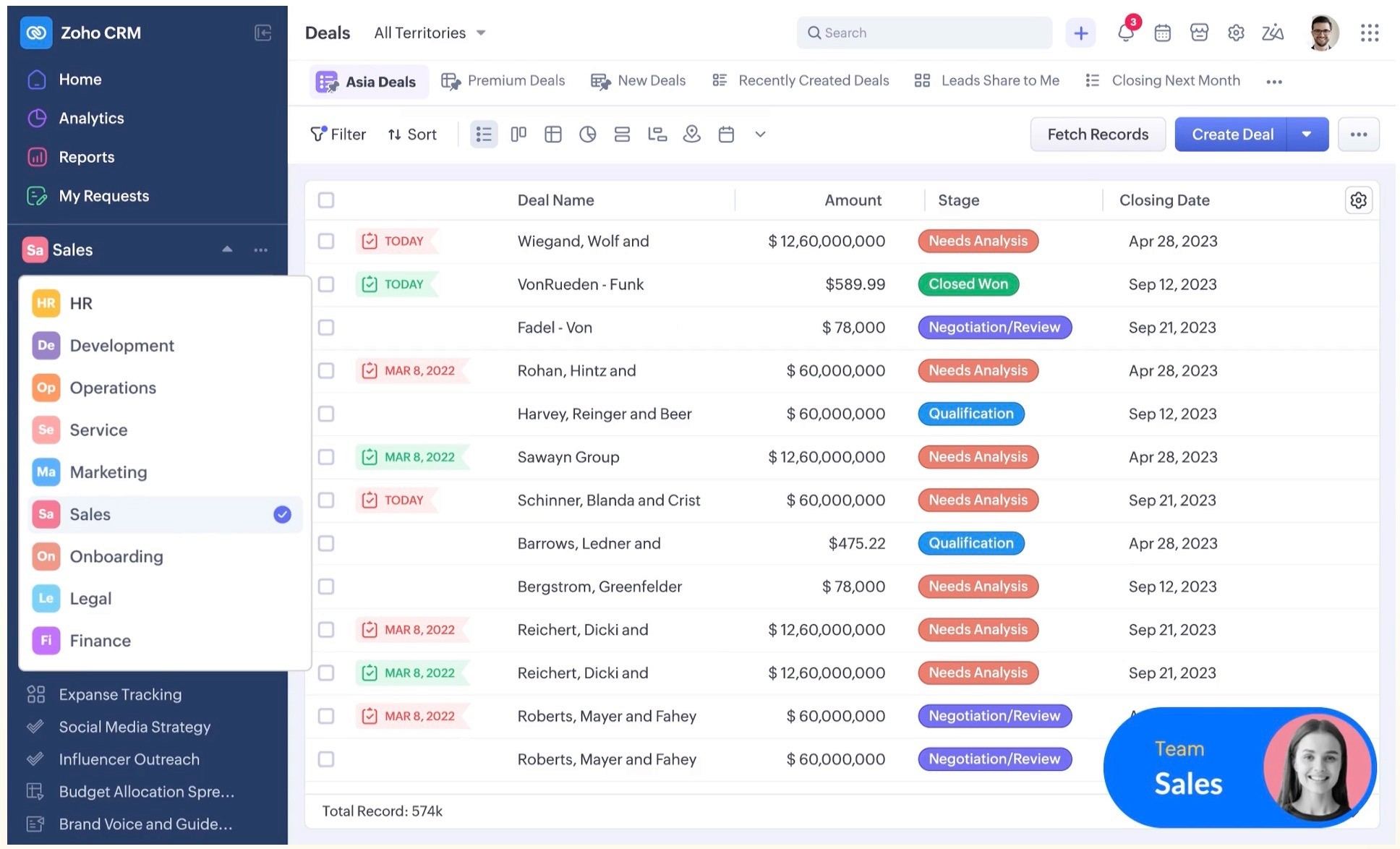
Its biggest strength is how far you can customize it, from page layouts and custom modules to scripted logic, often without writing code. The trade-off is that this depth takes setup time, and you get the most from it when you adopt other Zoho apps alongside the CRM.
Key features
Sales force automation handles contact tracking, follow-ups, and record updates, with built-in pipeline management and sales forecasting across all paid plans.
Blueprint enforces a structured, repeatable sales process, while Cadences build branching follow-up sequences that react to how each lead responds.
Customization runs deep through Canvas for no-code layout design, custom page layouts and modules, and Client Script and custom functions for tailored logic (custom functions on the Enterprise plan and above).
Zia, the built-in AI, handles predictions, anomaly detection, and email intelligence, with a fuller AI sales assistant available on higher tiers (AI sales assistant on the Enterprise plan and above).
CPQ lets you generate accurate quotes and pricing inside the CRM, which helps services firms scoping variable engagements (Professional plan and above).
Customer Portals give clients, partners, and vendors a space to engage directly with the firm (Enterprise plan and above).
Business intelligence tools provide dashboards and on-demand reports, and Journey Orchestration maps and automates end-to-end client journeys (Journey Orchestration on the Enterprise plan and above).
Pricing
Zoho CRM is priced per user per month and billed monthly or annually. There is a 15-day free trial with no credit card required, plus a Free Edition that covers leads, deals, workflows, reports, and a mobile app free forever for up to three users. Higher tiers add automation, AI, and customization depth, and local taxes apply on top of the listed price. The Ultimate plan also bundles consulting, migration assistance, and data preparation.
Standard (about $9 per user/month): Covers workflows and assignment rules, AI agents, Cadences, reports and dashboards, sales forecasting, and self-service kiosks.
Professional (about $16 per user/month): Adds CPQ, email intelligence, process automation, widgets, inventory management, and Google Ads integration.
Enterprise (about $28 per user/month): Adds the Zia AI sales assistant, Journey Orchestration, territory management, custom functions, wizards, and customer portals.
Ultimate (about $31 per user/month): Adds enhanced feature limits, consulting, migration assistance, custom AI and ML, and data preparation.
5. monday CRM
monday CRM suits teams that prize flexibility and a clear visual workflow over the deep sales-specific machinery of a dedicated sales CRM. Its standout trait is code-free customization, where you drag and drop deals, edit stages, and reshape processes in a few clicks. The trade-off is that it sits on a general work-management foundation, so some sales features are lighter than purpose-built rivals, and contact and automation volumes are capped by tier.

Key features
Code-free customization lets you adapt the CRM to any sales cycle by dragging deals, editing stages, and updating processes without writing code.
Automations remove manual work like lead assignment, follow-ups, and activity logging, with the volume of custom automations rising by plan (no custom automations on Basic, 250 per month on Standard, 25,000 per month on Pro).
Real-time reports and dashboards track rep performance and team targets, with the number of custom dashboards scaling by tier.
Sequences and mass emails let you generate, trigger, and track on-brand emails across the customer journey (Pro plan and above).
The platform connects pre-sales and post-sales work in one place, so legal, finance, and ops join at the right moment and handoffs do not stall, which matters for services delivery.
More than 500 integrations connect tools your team already uses, including Slack, Outlook, Gmail, Docusign, and Zoom.
A mobile app logs calls automatically, checks report statuses, and adds activities while you are on the move.
Pricing
monday CRM is priced per seat per month and billed monthly or annually, with annual billing roughly a third cheaper. You can start free with no credit card required, and pricing also scales with the number of seats you choose. Higher tiers lift the caps on contacts, dashboards, automations, and workspaces, and unlock mass email and sequences:
Basic ($12 per seat/month annually, $18 monthly): Covers 1,000 active contacts and deals, one custom dashboard, 20 quotes and invoices per month, and one workspace.
Standard ($17 per seat/month annually, $25 monthly): Adds 10,000 contacts, five dashboards, 250 custom automations per month, three workspaces, and the lite AI Sidekick.
Pro ($28 per seat/month annually, $41 monthly): Adds 100,000 contacts, 50 dashboards, 25,000 automations per month, 15 workspaces, mass emails, and email sequences.
Ultimate (custom quote): Adds unlimited contacts, dashboards, and workspaces, plus security and governance, multi-level permissions, HIPAA compliance, and enterprise-grade support.
Why Professional Services Firms Choose Rings AI
For professional services firms, the asset is the network and the history behind it, not a pipeline that empties the moment a deal closes. That is exactly where most CRMs work against you. They track deals well enough, but they forget who introduced whom, which partner owns a relationship, and what was said two years ago that still matters today.
Rings AI is built the other way around, starting from people and the full context attached to them, so a relationship gets richer over time instead of going cold the second a project wraps.
Why choose Rings AI as the CRM for your professional services firm:
It keeps every client's history with the firm instead of in one person's inbox, so anyone can pick a relationship back up after months of silence and know exactly where things stand.
You can see the real path into a target through your team's network, including investors, board members, and advisors that a plain contact list never shows, so you know who should make the introduction.
It builds your meeting prep for you, pulling from your full history with the client plus market and web context, so nobody walks in cold.
You don't have to chase the team to keep it current, because it logs email and meetings on its own rather than waiting for people to update fields.
It protects you when a key person leaves, since the relationship and its context stay with the firm instead of walking out the door.
Book a demo with Rings AI to see your firm's entire relationship network mapped, and ready to help you close more deals.